meta data for this page
Translations of this page:
- en
This is an old revision of the document!
Main Menu
Dialog selections are discussed below the image. For navigation to an item make a selection in the Design Menu image.
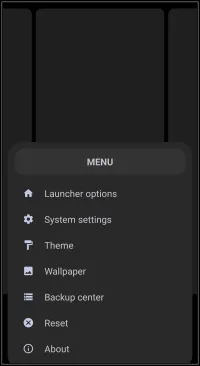
Main Menu dialog. Make selection above.
This dialog screen shows options for:
- Launcher options - Opens the main configuration menu for adjusting launcher behavior, user interface, and global settings.
- System settings - Accesses the Android device's native system settings menu.
- Theme - Opens the interface for browsing, applying, and managing the packaged launcher themes provided by the developer or for those interested in developing themes for distribution. For more information on themes and installation from external sources see this wiki secion.
- Wallpaper - Accesses the system wallpaper selection tool to set the system or app wallpaper for the launcher. These must already be available on the user device.
- Backup center - Provides a direct shortcut to the interface for saving, restoring, and managing layout backup files. This also offers a method for importing external backups from the cloud or other sources (such as users).
- Reset - Initiates the process to restore the launcher layout and settings to their initial default state.
- About - Displays application version information, developer credits, and links to support resources such as the developer's Blog and tutorials.
Comments & Feedback
Toby Lancer is ready to help! Look for the Quick Help form:
► Desktop: left sidebar located near the bottom for Private to Admin
► Mobile: 3-bar menu at page top.
► Use the Discussion section below to share any experiences and communications with other Total Launcher users.
► Any Registered User can directly update this and any wiki page if desired.
Moderation: To keep the manual clean, all comments are held for appropriateness review. Preview any comment before submitting it. It will not display after submission until reviewed. So, please, do not resubmit.
Formatting: If using any code snippets place them inside code tags (e.g., 'code') using double single quotes (') before and after to keep them readable.
Be Kind: This is a community effort. Please keep feedback constructive and on topic.
~~DISCUSSION~~