Resource: Typeface
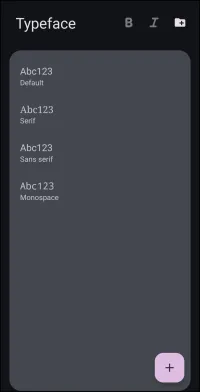
If NOT selecting any item and wanting to return to the prior page: swipe right-to-left; use the browser's 'back' arrow, or use the Wiki's Backlink  icon on the right sidebar (mobile: drop-down dialog at the top of the page).
This dialog represents the device's existing typeface collection and is the mechanism for adding or deleting typefaces.
- It is not for the selection of a typeface or font for a design area. This is done via the Text options dialog of the specific object.
The dialog elements discussed below are:
- B - Highlights (bold) which typefaces have bold formatting.
- I - Highlights (bold) which typefaces have italic formatting
 icon - Opens the system file picker to import custom typeface files from an entire folder into the Launcher resources. If the folder contains anything other than fonts, an error notification will appear.

- My fonts - Displays the current active list of typefaces available for application to Launcher objects.
- The “ABC123” reflects the font appearance.
- The line below the effect is the filename.ext
- Supported typeface extensions are
- TTF - True Type fonts
- OTF - OpenType fonts
- TTC - True Type Collection
- 16:9 (Standard) / Aspect Ratio Tabs - Represents optional screen resolutions for use. Determines the specific resources loaded based on the device's screen ratio to prevent element display skewing (such as images or text).
- This dialog in the app would scroll to the right, revealing alternative resolution options heavily utilized by multi-screen devices, including:
 Tip:
Tip:
• 16:9 (Standard)'' representing
standard 1080×2400 resolution
Add Single Font}} **icon** - Opens the device file manager to add a single, new typeface resource to the current list.
<WRAP GROUP>
<WRAP center round tip 60%>
For a complete review of **Typefaces & Fonts** and **Where to Get Them**
<WRAP centeralign>see [[:section:section-typeface|here.

</WRAP>
===== Hidden Index Anchors ===== start
Comments & Feedback
Toby Lancer is ready to help! Look for the Quick Help form:
► Desktop: left sidebar located near the bottom for Private to Admin
► Mobile: 3-bar menu at page top.
► Use the Discussion section below to share any experiences and communications with other Total Launcher users.
► Any Registered User can directly update this and any wiki page if desired.
Moderation: To keep the manual clean, all comments are held for appropriateness review. Preview any comment before submitting it. It will not be displayed after submission until it is reviewed. So, please, do not resubmit.
Formatting: If using any code snippets, place them inside code tags (e.g., 'code') using double single quotes (') before and after to keep them readable.
Be Kind: This is a community effort. Please keep feedback constructive and on topic.
~~DISCUSSION~~