meta data for this page
Icon Style: Folder Icons
Folder icon configurations determine how aggregated app containers display within home screen layouts.
Dialog selections are discussed below the image. To navigate to an item, select in the Folder Icons image.
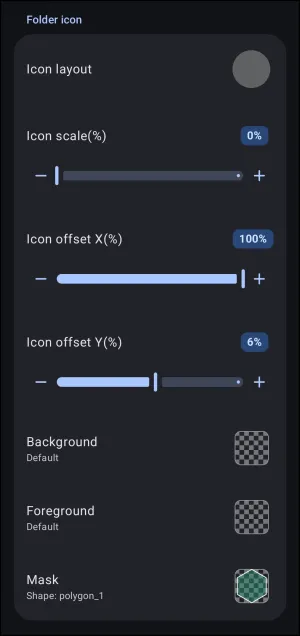
Folder Icons dialog. Make selection above.
The elements on this page are:
- Icon layout: - Configures the structural layout and thumbnail arrangement preview which is inside folder containers as shown in this dialog.

- Icon offset X(%): - Sets horizontal displacement of embedded thumbnails within folder bounds (e.g.,
100%).
- Icon offset Y(%): - Sets vertical displacement of embedded thumbnails within folder bounds (e.g.,
6%).
- Background: - Applies a custom background fill or graphic layer behind folder thumbnails.
- Foreground: - Applies a foreground overlay layer in front of folder thumbnails.
- Mask: - Enforces a custom vector shape mask (e.g.,
polygon_1) onto folder icon boundaries.
===== Hidden Index Anchors ===== * target_page_1 * target_page_2
You could leave a comment if you were logged in.
Comments & Feedback
Toby Lancer is ready to help! Look for the Quick Help form:
► Desktop: left sidebar located near the bottom for Private to Admin
► Mobile: 3-bar menu at page top.
► Use the Discussion section below to share any experiences and communications with other Total Launcher users.
► Any Registered User can directly update this and any wiki page if desired.
Moderation: To keep the manual clean, all comments are held for appropriateness review. Preview any comment before submitting it. It will not be displayed after submission until it is reviewed. So, please, do not resubmit.
Formatting: If using any code snippets, place them inside code tags (e.g., 'code') using double single quotes (') before and after to keep them readable.
Be Kind: This is a community effort. Please keep feedback constructive and on topic.
~~DISCUSSION~~