meta data for this page
Action - Sound
Dialog selections are discussed below the image. To navigate to a prior page: swipe right-to-left; use the browser’s ‘back’ arrow, or use the Wiki’s Backlink  icon on the right sidebar (mobile: drop-down dialog at the top of the page).
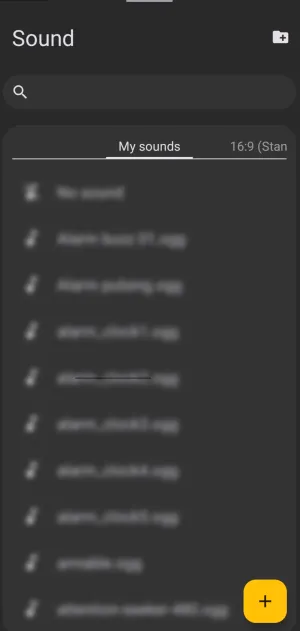
Resource Window dialog. Make selection above.
The elements in the above dialog are discussed below:
- Folder add
 - If a user has a folder of sounds to add to Total Launcher, this opens the device's default file explorer so the user can navigate to the folder's location. Selecting the folder adds all files in it to TL.

- Search
 - Searches the existing sound files shown in the My Sounds listing below, using both incremental and mid-sequence search techniques. In other words, text entered as “soft” will find “soft” and “verysoft”. Once the user selects a file, that file is used for the action.

- My Sounds - An alphabetical listing of all user-device sound files supported by the mp3, wav, ogg, acc, and m4a formats. The above image is blurred because the file listing is user- and device-specific. A user would select an existing file from the list to add it to the object sound action.
- Add icon
 - Similar to the Folder add icon above, but this provides for the selection and addition of a single file.
**All user-selectable items on this page result in a return to the previous page in the app (Option - Action on Tap) after selecting the user's device sound files.
You could leave a comment if you were logged in.
Comments & Feedback
Toby Lancer is ready to help! Look for the Quick Help form:
► Desktop: left sidebar located near the bottom for Private to Admin
► Mobile: 3-bar menu at page top.
► Use the Discussion section below to share any experiences and communications with other Total Launcher users.
► Any Registered User can directly update this and any wiki page if desired.
Moderation: To keep the manual clean, all comments are held for appropriateness review. Preview any comment before submitting it. It will not be displayed after submission until it is reviewed. So, please, do not resubmit.
Formatting: If using any code snippets, place them inside code tags (e.g., 'code') using double single quotes (') before and after to keep them readable.
Be Kind: This is a community effort. Please keep feedback constructive and on topic.
~~DISCUSSION~~