meta data for this page
Launcher Options Menu
Dialog selections are discussed below the image. For navigation to an item, make a selection in the Launcher Options Menu image.
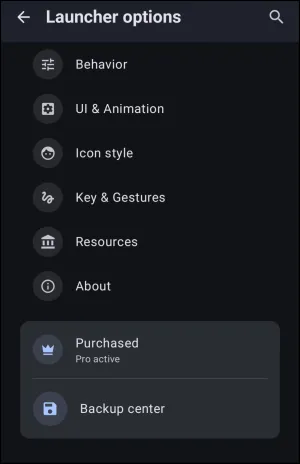
Main Menu: Launcher Options dialog. Make selection above.
This dialog screen shows options for:
Some listed options are premium features (such as Purchased by a  icon) or available throughout the app by its “Pro”
  icon.
icon.
- Behavior - Accesses settings configuring global Launcher operations, such as infinite scrolling, screen orientation, app drawers, badge counts, lock levels, and more.
- UI & Animation - Provides options to adjust visual transitions, the device's system interface visibility, blurs/dims, sliding drawer availability, and animation speeds.
- Icon style - Configures global settings for applying icon packs, adjusting default icon sizes, and defining icon shapes.
- Key & Gestures - Determines the actions assigned to device hardware buttons and screen touch gestures for both portrait and landscape positions of the device.
- Resources - Opens the manager for handling images, fonts, shapes, sounds, windows, sequences, and other assets utilized within the current design.
- About - Provides the URL to the developer's Official Blog, Google Play rating form, tutorial links, and licenses.
- Purchased - Opens the menu to verify premium status and manage the activation of premium features.
- Backup center - Accesses the interface for saving, restoring, and managing backup files of the Launcher layout. It also includes the capability to import backup files from external sources or users
===== Hidden Index Anchors ===== ui-launcher_options-behavior ui-launcher_options-ui_anim ui-launcher_options-icon_style ui-launcher_options-gestures ui-launcher_options-resources ui-launcher_options-about ui-launcher_options-purchase ui-launcher_options-backup_center
You could leave a comment if you were logged in.
Comments & Feedback
Toby Lancer is ready to help! Look for the Quick Help form:
► Desktop: left sidebar located near the bottom for Private to Admin
► Mobile: 3-bar menu at page top.
► Use the Discussion section below to share any experiences and communications with other Total Launcher users.
► Any Registered User can directly update this and any wiki page if desired.
Moderation: To keep the manual clean, all comments are held for appropriateness review. Preview any comment before submitting it. It will not be displayed after submission until it is reviewed. So, please, do not resubmit.
Formatting: If using any code snippets, place them inside code tags (e.g., 'code') using double single quotes (') before and after to keep them readable.
Be Kind: This is a community effort. Please keep feedback constructive and on topic.
~~DISCUSSION~~