meta data for this page
Launcher v4.1.0 Update Review
 Total Launcher version
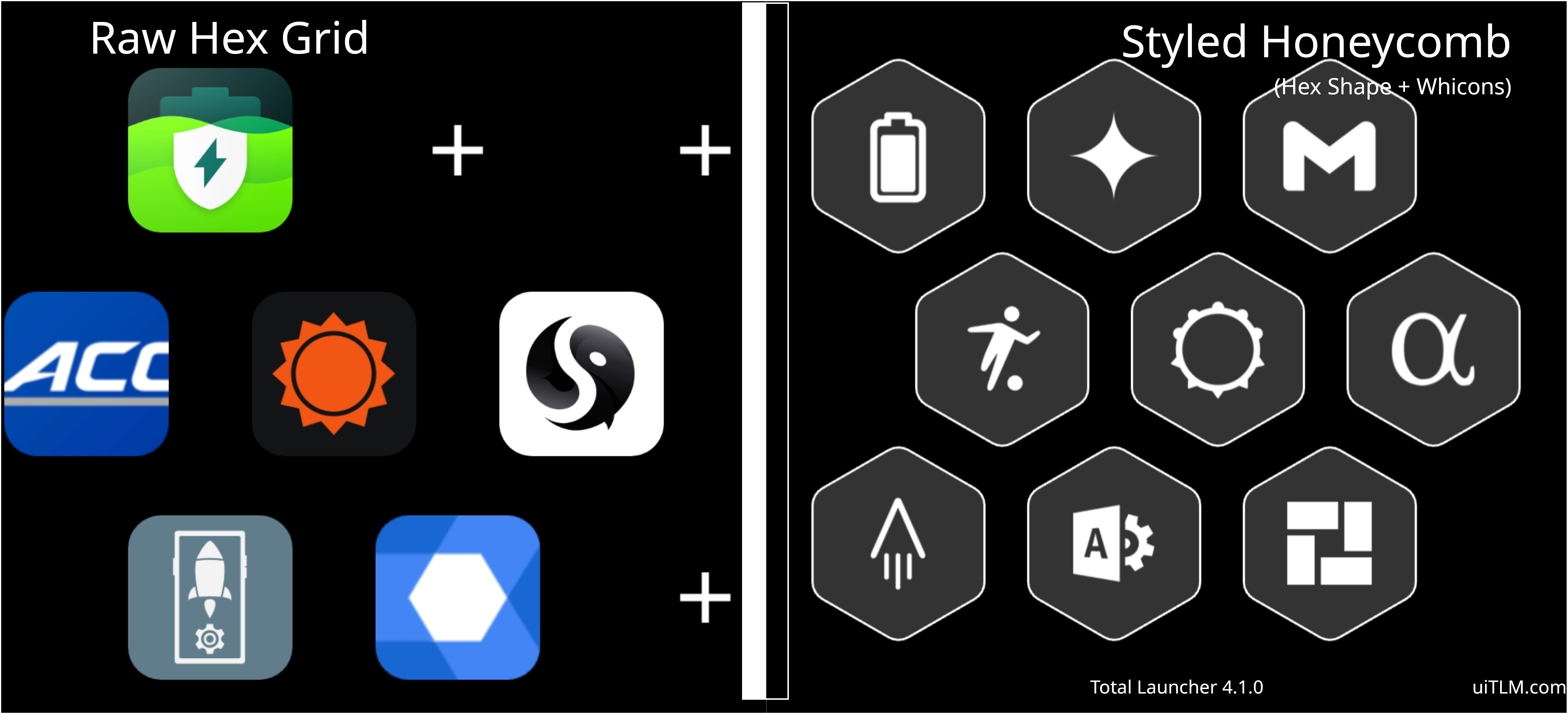
 4.1.0 introduces advanced layout geometry, deeper Android 15 edge-to-edge integration, dedicated folder security, responsive grid row calculation, and native enterprise profile organization:
- Layout - Hex format: Introduces a staggered hexagonal arrangement for container objects, app groups, and drawers, enabling honeycomb UI configurations and seamless pairing with 6-sided Polygon shapes.
- Shift odd rows Toggle - Controls the horizontal staggering direction for the interlocking hexagonal rows. When disabled (default), even-numbered rows (2, 4, 6…) shift right by half a cell width. When enabled, odd-numbered rows (1, 3, 5…) shift right instead.
- Columns - Determines the number of horizontal cells allocated per row. In a hex layout, alternating rows are offset by half a column width to create the interlocking honeycomb lattice.
- System Bar - Adaptive Colors (Android 15+): Located under
Launcher options > UI & Animations. Dynamically calculates underlying canvas luminance to switch status and navigation icons between light and dark modes automatically.- Note: Enabling this option automatically overrides and greys out the manual
Dark icon on status barandDark icon on navigation bartoggles. - Recommendation: Use Adaptive for multi-page setups with mixed-color wallpapers or day/night shifting themes. Use the manual Dark icon toggles for fixed themes with uniform, static backgrounds or dedicated status bar backplates.
- Folder Lock: Adds an independent security toggle inside
Folder options, requiring master password/PIN verification before opening specified folder contents.
- Adaptive Number of Rows (Rows = 0): Available across grid-type objects—including Layout (Grid, List, Hex) and Widgets (App Drawer, App Drawer [Pager], App Group, and Contacts). Setting rows to
0automatically determines row count based on container height:- Threshold-Based Row Drops: While resizing the container influences item dimensions to a minor degree, crossing a mathematically determined height threshold drops or adds an entire row; in scrollable containers (such as the App Drawer), any off-boundary rows remain accessible through scrolling.
- Preserves Cell Proportions: Unlike fixed row counts—which squash icon heights and truncate labels when a container shrinks—setting rows to
0preserves native icon, font, and padding dimensions. - Dynamic Thresholds: Decreasing container height drops visible rows once vertical space falls below the minimum required height per cell, converting excess content into scrollable space (in drawers) or clipping off-boundary items (in non-scrollable containers).
- Responsive Display Scaling: Optimizes adaptive layouts across foldable inner/outer screens, multi-window splits, and device rotations without requiring separate fixed-row configurations.
* Share / Import Images & Fonts Directly to TL Resources: Allows sharing font files (.ttf, .otf) and image assets (.webp, .png, .jpg) directly from external file managers, cloud drives, or web browsers into Total Launcher via the Android Share menu, automatically depositing them into Resources > Font or Resources > Image without manual file browsing.
- “Work Apps” Tag Support: Incorporates a native tag filter within the App Drawer to categorize Android Enterprise work profile applications (identified by the system briefcase badge) automatically:
- Native Sandboxing: Designed for devices enrolled in corporate MDM environments or running profile sandboxes (such as Google Test DPC, Island, or Shelter).
- Automatic Filtering: Groups dual-instance work apps into a single tag without requiring manual tag configuration. Devices without a configured work profile will show this tag as empty or inactive.
 Tip: Step-By-Step Guide to using the
 Work tagin the non-corporate, personal environment using the Island app.
You could leave a comment if you were logged in.
Comments & Feedback
Toby Lancer is ready to help! Look for the Quick Help form:
► Desktop: left sidebar located near the bottom for Private to Admin
► Mobile: 3-bar menu at page top.
► Use the Discussion section below to share any experiences and communications with other Total Launcher users.
► Any Registered User can directly update this and any wiki page if desired.
Moderation: To keep the manual clean, all comments are held for appropriateness review. Preview any comment before submitting it. It will not be displayed after submission until it is reviewed. So, please, do not resubmit.
Formatting: If using any code snippets, place them inside code tags (e.g., 'code') using double single quotes (') before and after to keep them readable.
Be Kind: This is a community effort. Please keep feedback constructive and on topic.
~~DISCUSSION~~