meta data for this page
- en
<!-- googleoff: index -->
⚠️ v4.0 UI Transition Notice - In Process: The release of Total Launcher v4.0 has introduced significant user interface changes. Please note that this page does not yet reflect these updates. The new layout paths, folds, and visual maps are currently being compiled and will be deployed shortly.
<!-- googleon: index -->
Folder Thumbnail Background
Dialog selections are discussed below the image. For navigation to an item make a selection in the Folder Thumbnail Background image.
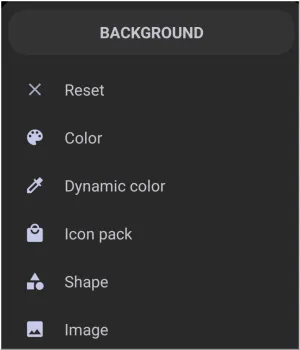
Folder Thumbnail Background dialog. Make selection above.
The dialog's elements shown above are discussed below:
- Reset - When selected, the user is returned to the originating page without any changes being activated. If in trouble, it is a “Get out of jail, free!” card.
- Color - Allows for the selection of ARGB colors using Total Launcher's Color Picker utility. For Text, Shapes, Layouts and Windows this is a very usable background element. For Widget containers, Icons (some), and Images, the selected color could significantly overlap the main object unless it was applied with a more transparent hue. Experimentation is a good teacher. See more about this Color Picker and then return here.
- Dynamic color - The point made in the previous feature “Color” can also apply here in Dynamic Color. Bother are “colors”. Dynamic color are colors based on Android's Material You design language and a system which adapts the Launcher’s color palette based on the user's wallpaper or theme. It uses predefined roles, like “Primary,” “Secondary,” “Error,”, to apply consistent and appealing colors across different UI elements based on the user's setup color scheme. See Customize Dynamic Color for more discussion.
- Icon Pack - Icons or icons from icon packs can be used in backgrounds mostly as an opaque image or in a modified transparency mode which rests behind a foreground such as text or another graphic. These icons can come from applications or be included in Total Launcher's built-in icons or downloaded from the Google Play Store.
- Shape - Shapes, with their color and gradient fills, can satisfy nicely as backgrounds, but again, have the same cautions as basic color, dynamic color, and icon packs: opaque qualities can cause issues. Shapes can also be used to blur a wallpaper background.
- Image - Displays the launcher's Resource category for image storage.
===== Hidden Index Anchors ===== ui-folder-options-folder_style ui-color_picker ui-dynamic_color ui-generic-icon_pack ui-launcher_options-resources-shape ui-launcher_options-resources-image
Discussion